Brian Krogsgard

PushUp offers push notification integration for WordPress and Mac OS X

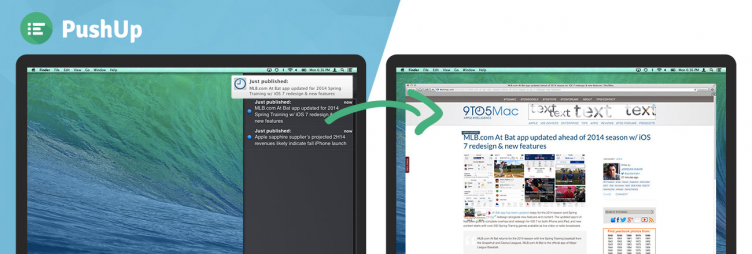
pushupPushUp is a new product from 10up that offers push notification integration between WordPress and Mac OS X Mavericks.

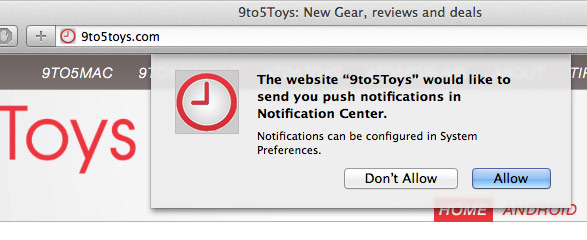
Currently, only Safari is supported and users must opt-in by viewing a website in Safari, where they are greeted by a popup that prompts them to enable push notifications from a specific website:
pushup-notiftication-request

If a site visitor allows the push notifications, then the website publisher can optionally choose to enable notifications on a per-post basis, via a checkbox in the Publish box.

They’ve published a video to more fully portray how PushUp works:

Only Safari support for now

10up has been beta testing the product on large production sites such as 9to5Mac and Edelman since January. They plan to add support for Chrome and Firefox as soon as the browsers catch up to Safari’s implementation of push notifications.

Once a user opts-in via Safari, notifications work whether the browser is open or not. I don’t personally remember the last time I opened Safari, and I’m sure I’m not the only one, so while offline notifications is awesome, I’ll be even more interested in this product once they are able to support Chrome and Firefox.


Read more

Recommendations for improving WordPress comments

wp-comments-need-workThere are a number of things that concern me in regard to WordPress comments. They are one of those features that I have a love hate relationship with.

Comments are great for active, well moderated communities. I genuinely enjoy receiving comments from Post Status readers, where people often add value to the conversation.

For many websites, comments can be a sad and inactive wasteland or a trollfest. For most business and corporate websites I’ve worked on, comments are not wanted at all.

There seems to be a sweet spot of niche and medium-sized websites where comments tend to be most valuable.

But WordPress is fairly aggressively pro-comments by default.

Considering these things, I think we should take a look at default WordPress comment behavior and talk about how we may be able to improve the overall experience.

Comments should be off on pages by default

What percentage of WordPress pages do people really want comments on? I can think of very few scenarios where that’s the desired behavior.

I think they are almost universally a posts-only feature, especially in the era of WordPress-the-CMS.

I believe comments on pages should be off by default with WordPress. I think they should be off for registered custom post types by default as well.

I realize removing support for comments on pages and CPTs is probably out of the question, but we could at least make them un-checked or toggled off. If you want to do so yourself, you can use this simple but excellent filter for turning off comments for pages in your theme or functionality plugin:

[gist id=”02df9fc6fe5bd758d21c”]

Note that this also turns off pings, which I also always do for pages.

“Website” should be easier to remove from comment forms

Read more

How to properly change and reference various WordPress directories

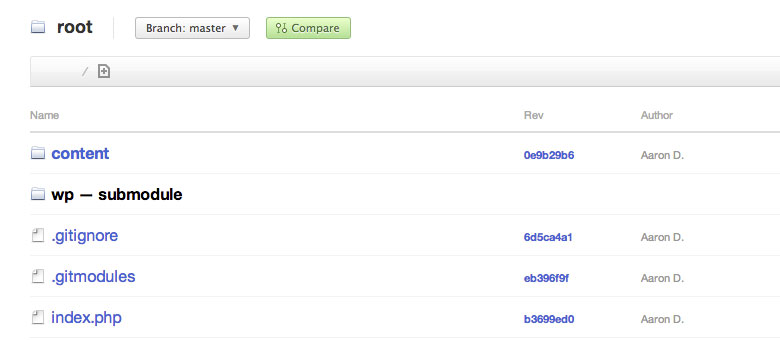
root-wp-directory-git

Using WordPress, it’s a poor assumption to assume the wp-content, plugins, and uploads folders are always in the same place, or even always called by those names.

The configuration you see above is a sample WordPress root directory. This isn’t uncommon. Many people who manage their installs with version control such as Git probably recognize this format.

As you can see above, WordPress core has its own folder, wp, so that core is not at the root level. This allows us to include WordPress as a submodule of our project, and makes for a cleaner experience.

You’ll also notice that wp-content is actually called content.

Now you can see why it’s not a good idea to hard code the uploads, plugins, or wp-content directories into your plugins.

This point was made by Pippin Williamson on Twitter the other day, and he and Brad Touesnard discussed it on Apply Filters yesterday — an excellent podcast by the way.

How to change default directories

You can see how to edit wp-config to define the wp-content directory and URL using constants in wp-config.php.

define('WP_CONTENT_DIR', __DIR__ . '/content' );
define('WP_CONTENT_URL', 'http://mysiteurl.dev/content');

You can similarly alter your default plugins directory:


define( 'WP_PLUGIN_DIR', dirname(__FILE__) . '/content/plugins' );
define( 'WP_PLUGIN_URL', 'http://mysiteurl.dev/content/plugins' );

And again for uploads:

define( 'UPLOADS', '/content/uploads' );

You can learn more about various things you can define and utilize with this excellent Codex resource.

How to reference default directories, the right way

Now, let’s show a couple examples for referencing these directories the right way.

Read more

Interview with Drew Strojny, Founder of The Theme Foundry

drewstrojnyI had the pleasure to interview Drew Strojny, founder of The Theme Foundry, about their work at The Theme Foundry, their philosophies about themes, and their latest theme release, Oxford.

Direct Download

Drew is a former Duke football player that spent a few years in the NFL before he started a small business doing general marketing. Over time, his clients started asking for websites, so he discovered WordPress. His work with web projects led him to start designing WordPress themes, and he ended up being an early player in the commercial theme market in 2008.

Competition with themes over time

In 2008, there weren’t many people selling themes. Chris Pearson was selling Thesis, Brian Gardner was selling Revolution, pre-Genesis. WooThemes was just underway. But the demand was enormous.

Well, I thought we’d just throw our hat into the ring and try a design and see how it goes, and we got a really huge response.

It was really great timing on our part. It was one of the best times to get into the theme market.

The WordPress theme space really exploded for a few years. Drew notes that they haven’t seen the explosive growth in the past couple years compared to the first two

The market is maturing and there are a lot more companies in the space, and a lot more options.

Setting themselves apart

I asked Drew how The Theme Foundry sets themselves apart from the competition, considering just how many theme providers there are now. They like to tout their “world class design and clean code” when they market their themes.

They do most of their design in house, but they also commission some designs to get outside the bubble of the “WordPress theme” concept, and those commissioned themes help them expand their work.

John Hicks designed Shelf. Ryan Essmaker designed the Anthem theme, Dave Ruiz designed the Avid theme, and most recently Veerle Pieters designed the Collections theme.

The Theme Foundry notably doesn’t use any form of framework and attempts to limit theme options as much as possible. When they sell a theme to a customer, they want it to “just work” and be reliable over time.

The impact of selling themes on WordPress.com

Read more

How to deactivate WordPress Multisite properly

WordPress Multisite is a great feature of WordPress. But it’s not always the right feature.

I just disabled Multisite on my personal blog. I used it for the wrong reasons back in the day, and have either deleted or moved the sites in the network. It was time to disable Multisite completely.

There isn’t much documentation on this, and none that’s totally thorough. Here are the primary steps, in order of how you should disable Multisite to really get rid of everything:

Remove any remaining sites

Remove all sites from your Multisite installation, other than your main site, by going to My Sites > Sites in the WordPress admin. If you need to move a subsite to its own WordPress install, that’s out of scope from this article, but also possible if you roll your sleeves up.

Remove unwanted users

Remove any users you don’t want to have access to your website anymore. Just because you delete a site doesn’t delete users associated with that site, because the users in Multisite are global. So you’ll want to clean up your user accounts by going to the Users section of the admin.

Remove Multisite lines from WP Config

Read more

our sponsors

Hosting.com logo
Omnisend
Kinsta
Progress Planner
Elementor
WP Munich
Atarim
Patchstack

Looking for our logo?

You're in the right spot!

Check out our Logo & Style page.